1. 了解KT板飞机结构1. Understanding the KT Foam Airframe
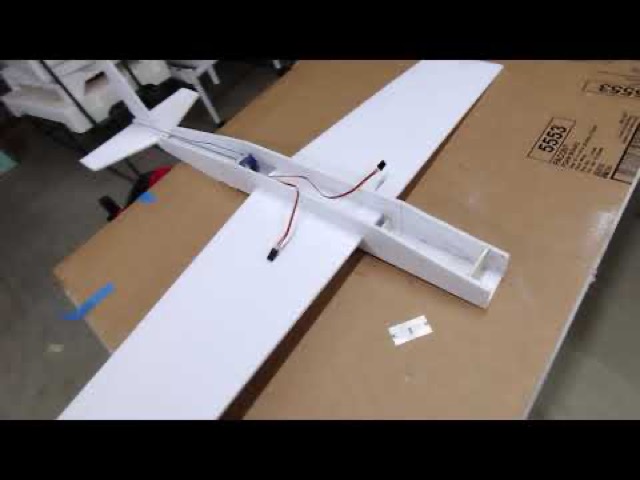
KT板(Foam Board,又称KT泡沫板)是一种由聚苯乙烯泡沫芯加纸面构成的复合材料,重量极轻、易于切割成型,是制作小型遥控飞机的理想材料。
KT foam board is a composite material with a polystyrene foam core and paper facing — extremely lightweight, easy to cut and shape, making it ideal for small RC aircraft.
✅ KT板的优点✅ Advantages of KT Foam
- 成本低廉,随处可购Low cost, widely available
- 质量超轻,推重比高Ultra lightweight, high thrust ratio
- 易切割成型,适合自制Easy to cut and shape, great for DIY
- 损坏可轻松修复Easy to repair when damaged
- 适合3D和4D飞行Suitable for 3D and 4D flying
⚠️ 注意事项⚠️ Things to Note
- 耐撞性不如木质机Less crash-resistant than wood
- 高温和潮湿环境需注意Sensitive to heat and moisture
- 重度损坏需更换板材Heavy damage requires new foam
- 结构较软,需要正确粘接Softer structure needs proper bonding
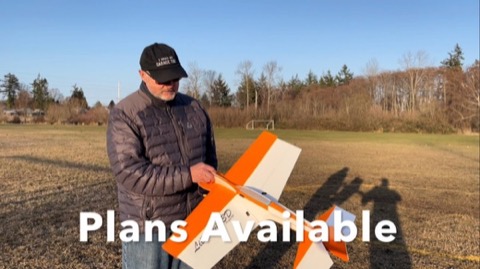
一架典型的KT板特技飞机由机翼、机身、尾翼(水平尾翼+垂直尾翼)、舵面(副翼、升降舵、方向舵)组成。了解这些部件的名称和功能,是学习飞行的第一步。
A typical KT foam aerobatic plane consists of wings, fuselage, tail surfaces (horizontal and vertical stabilizers), and control surfaces (ailerons, elevator, rudder). Understanding these components is the first step in learning to fly.
2. 电子设备选购指南2. Electronics Buying Guide
电子设备是RC飞机的核心,选对设备不仅能提升飞行体验,还能避免不必要的损失。以下是初学者需要了解的关键组件:
Electronics are the heart of an RC plane. Choosing the right components enhances your flying experience and prevents unnecessary losses. Here are the key components beginners need to understand:
🔋 电机(Motor)🔋 Motor
无刷电机是KT板飞机的主要动力来源。对于入门机型,推荐选用KV值在1000-1400之间的外转子无刷电机,配合5-6寸螺旋桨使用。KV值越低,扭矩越大,适合大桨慢速旋转;KV值越高,转速越高,适合小桨高速旋转。
Brushless motors are the primary power source for KT foam planes. For beginner models, an outrunner brushless motor with KV rating of 1000-1400 is recommended with 5-6 inch propellers. Lower KV means more torque for large slow props; higher KV means more RPM for small fast props.
⚡ 电调(ESC)⚡ Electronic Speed Controller (ESC)
电调负责调节电机转速,其电流容量应高于电机最大电流的120%以保留余量。入门机型通常使用20-30A电调,确保支持BEC(电池消除电路)为舵机供电。
The ESC regulates motor speed. Its current rating should be 120% above the motor's maximum current for safety margin. Beginner models typically use 20-30A ESCs with built-in BEC to power servos.
🎮 舵机(Servo)🎮 Servo
舵机控制飞机的各个操纵面。KT板飞机通常需要3-4个舵机。入门机型选用3.5-9g的微型舵机即可,3D飞机则需要高精度、快速响应的数字舵机。
Servos control the aircraft's control surfaces. KT foam planes typically need 3-4 servos. Beginner models can use 3.5-9g micro servos; 3D planes require high-precision, fast-response digital servos.
📡 遥控器与接收机📡 Transmitter and Receiver
建议初学者选购支持4通道以上的2.4GHz遥控系统。主流品牌如Radiomaster、Spektrum、Futaba均有适合入门的套装。接收机需与遥控器品牌兼容,确保信号稳定可靠。
Beginners should choose a 2.4GHz radio system with at least 4 channels. Popular brands like Radiomaster, Spektrum, and Futaba all have beginner-friendly combos. The receiver must be compatible with your transmitter brand for reliable signal.
💡 小贴士💡 Pro Tip
推荐购买完整的入门套装(包含遥控器+接收机),这样可以确保兼容性,避免选购困惑。许多商家提供"新手包",包含常用组件,性价比更高。Consider buying a complete beginner bundle (transmitter + receiver) to ensure compatibility. Many shops offer "starter packs" with all common components at better value.
3. 所需工具与材料3. Tools and Materials
制作KT板飞机不需要昂贵的专业工具,以下基本工具即可完成大多数机型的制作:
Building KT foam planes doesn't require expensive professional tools. The following basic tools are sufficient for most models:
🔧 基本工具🔧 Basic Tools
- 美工刀/剪刀Utility knife / scissors
- 金属直尺Metal ruler
- 热熔胶枪Hot glue gun
- 泡沫胶水(CA胶)Foam glue (CA glue)
- 切割垫Cutting mat
- 烙铁(BBQ铁签)Soldering iron
🛒 主要材料🛒 Main Materials
- KT板(5mm厚)KT foam board (5mm)
- 竹签/碳纤维管(加强)Bamboo/carbon rod (reinforcement)
- 轻木条(翼梁加强)Balsa strip (spar reinforcement)
- 魔术贴(固定电池)Velcro (battery mount)
- 收缩膜(选配)Heat shrink film (optional)
- 连杆/U型钉Pushrods / Z-bends
4. 模拟器练习——新手必经之路4. Simulator Practice — Essential for Beginners
在进行实机飞行前,强烈建议使用RC飞行模拟器进行充分练习。模拟器可以让您在不损失任何设备的情况下掌握基础飞行技能,大大缩短实机学习周期。
Before flying a real plane, we strongly recommend practicing with an RC flight simulator. Simulators let you master basic flying skills without damaging any equipment, significantly shortening the learning curve.
推荐模拟器软件Recommended Simulator Software
- RealFlight — 最专业的RC飞行模拟器,飞行物理极为逼真,支持USB遥控器连接The most professional RC simulator with realistic physics, supports USB transmitter connection
- Phoenix RC — 经典入门模拟器,机型丰富,价格合理Classic beginner simulator with many models at reasonable price
- Aerofly RC — 画面精美,适合高分辨率显示器Beautiful graphics, great for high-resolution monitors
- Freerider Recharged — 免费/低价选择,轻量级,适合初步体验Free/low-cost option, lightweight, good for first experience
💡 练习建议💡 Practice Tips
建议先在模拟器上练习:直线平飞→转弯→起降→悬停,每个动作熟练后再进行下一个。通常200小时模拟飞行后,实机上手会非常顺畅。Practice in order: straight flight → turns → takeoff/landing → hover. Once comfortable with each, move to the next. Around 200 simulator hours usually leads to smooth real-plane flying.
5. 安全首飞指南5. Safe First Flight Guide
当您在模拟器上已经能够稳定飞行,并且完成了实机的组装和调试,就可以进行令人兴奋的实机首飞了!以下是确保首飞安全顺利的重要步骤:
When you can fly stably in the simulator and have assembled and tuned your real plane, you're ready for the exciting first real flight! Here are the important steps to ensure a safe first flight:
📍 场地选择📍 Field Selection
- 选择开阔平坦的空地,远离人群和建筑Choose open flat ground, away from people and buildings
- 避免在高压线、树木密集区附近飞行Avoid flying near power lines or dense trees
- 有条件的话在专业RC飞行场地飞行Fly at a dedicated RC flying field if possible
- 风速不超过5级(约8m/s)时飞行Fly only when wind is below Force 5 (~8m/s)
✅ 飞行前检查清单✅ Pre-Flight Checklist
- 检查所有舵面是否正确运动(方向正确、无卡滞)Check all control surfaces move correctly (right direction, no binding)
- 确认遥控器与接收机配对成功Confirm transmitter and receiver are bound
- 检查电池电量充足(≥80%)Check battery is sufficiently charged (≥80%)
- 确认重心位置正确(按设计重心)Confirm center of gravity is correct (per design)
- 检查螺旋桨安装牢固无损伤Check propeller is securely mounted and undamaged
- 测试油门曲线和端点行程Test throttle curve and endpoint throws
🛡️ 安全提醒🛡️ Safety Reminder
首飞建议在有经验飞手的陪同下进行。保持飞机始终在视线范围内,了解当地法规关于无人机和RC飞机的飞行限制。Have an experienced pilot accompany you for your first flight. Always keep the aircraft within line of sight, and be aware of local regulations regarding RC aircraft flying restrictions.
6. 进阶方向6. Taking It Further
掌握基础飞行技能后,您可以逐步向更高难度的飞行技术进发。RC特技飞行是一个学无止境的领域,每一个阶段都有新的挑战和乐趣。
Once you've mastered basic flying skills, you can gradually advance to more challenging techniques. RC aerobatics is an endless learning journey where each level brings new challenges and joy.
📈 进阶路线📈 Skill Progression
- 基础飞行(直线、转弯、起降)Basic flight (straight, turns, landing)
- 初级特技(筋斗、滚转)Basic aerobatics (loops, rolls)
- 中级特技(快滚、眼镜蛇)Intermediate (snap roll, cobra)
- 3D飞行(悬停、刀锋)3D flight (hover, knife-edge)
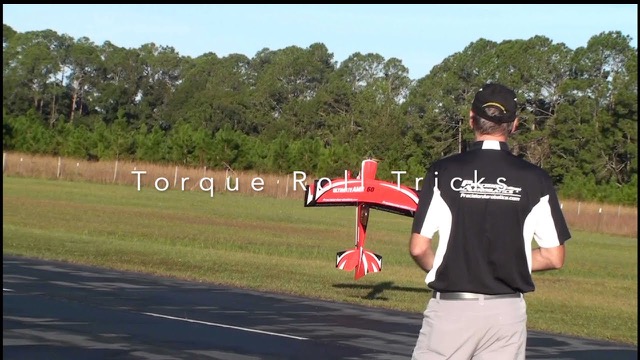
- 4D飞行(倒飞悬停、扭矩滚)4D flight (inverted hover, torque roll)
🔗 推荐资源🔗 Recommended Resources
- 查看本站机型介绍了解进阶机型Browse our model guides for upgrade options
- 参考本站制作教程动手挑战Follow our build tutorials for hands-on practice
- 加入本地RC飞行俱乐部Join a local RC flying club
- 观看YouTube上的教学视频Watch instructional videos on YouTube